Press and holf the power button until the screen lights up.
Turning the device off
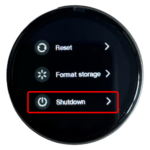
Press and hold the power button for approximately 3 seconds until the menu appears.
Tap the “>” icon next to Shutdown.
Select Yes to power off the device.
HOW DO I ENABLE TOUCH PROTECTION?
To enable Touch Protection
Press and hold your finger in the centre of the screen.
Continue holding until the padlock icon becomes solid, indicating Touch Protection is enabled.
To disable Touch Protection
Press and hold your finger in the centre of the screen.
Continue holding until the unlocked padlock icon becomes solid white
HOW DO I ADJUST THE BRIGHTNESS AND SLEEP SETTINGS?
Ensure the device is unlocked.
Swipe down from the top of the screen to open the quick settings menu.
Sleep Mode
Tap the leaf icon to enable or disable Sleep Mode. When enabled, the display will automatically switch off after 10 minutes of inactivity to help conserve the battery life.
Brightness
Tap the sun icon repeatedly until you reach your preferred brightness level.
^ Close the menu
Swipe up to hide the quick settings menu.
HOW DO I CHARGE THE DEVICE?
To charge the device, the outer chassis must first be opened.
Using a plastic prying tool (recommended), carefully insert the tool into the seam around the edge of the device.
It is usually easiest to begin near the next, where the external button is located.
Gently work the tool around the edge until you reach the opposite side of the device.
Carefully apply gentle pressure until the chassis separates into two halves.
Remove the screen from the rear housing. You may need to use the prying tool again to gently lift it out.
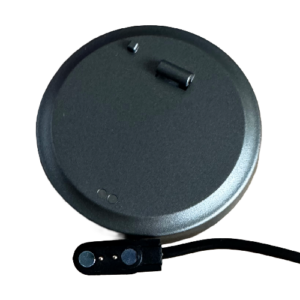
Connect the supplied magnetic charging cable to a USB power source.
Attach the magnetic connector to the two charging contacts on the back of the screen.
The charging connector is magnetic and will only attach in the correct oritenation.
Once connected, the screen will power on and display the current battery charge percentage.
IMPORTANT: Only use gentle pressure when opening the chassis to avoid damaging the casing.
HOW DO I REASSEMBLE THE DEVICE?
Rotate the screen so the two external buttons are positioned approximately at the 12 o’clock and 2 o’clock positions
Insert the screen into the rear housing, ensuring the screen’s button aligns with the button opening in the casing.
Place the external button onto the locating peg in the rear housing with the sloped face pointing towards the back of the device.
Align the neck section of the front cover with the neck on the rear housing.
Press the two halves together firmly until they click securely into place.
The device is now ready for use.
IN THIS GUIDE
Turn the screen on and off
Touch Protection
Brightness and Sleep Settings
Charging the device
Reassembly
NEED MORE HELP?
If you’re still having trouble or need assistance with your tracking, we’re here to help.